
An app registration within Microsoft Entra Admin Centre is used to integrate with Cyberknowledge.
To begin:
- Login to Microsoft Entra Admin Centre
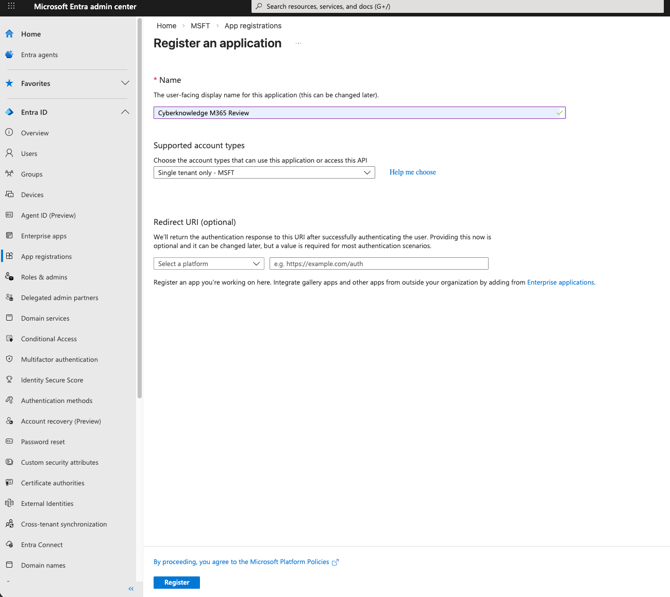
- Navigate to App Registrations
- Click New Registration
- Set the account to the main account
- Click Register to create the application
- Under the newly created application navigate to API permission > Add a permission
- Select Microsoft Graph > Application permissions and set the following permissions:
- Application.Read.All
- AuditLog.Read.All
- Directory.Read.All
- Domain.Read.All
- IdentityRiskyUser.Read.All
- InformationProtectionPolicy.Read.All
- MailboxSettings.Read
- Organization.Read.All
- Policy.Read.All
- Policy.Read.AuthenticationMethod
- RoleEligibilitySchedule.Read.Directory
- RoleManagement.Read.Directory
- SecurityEvents.Read.All
- SensitivityLabels.Read.All
- SharePointTenantSettings.Read.All
- TeamSettings.Read.All
- User.Read.All
- UserAuthenticationMethod.Read.All
- Select Grant admin consent for permissions
- Navigate to Certificates & secrets
- Select New client secret
- Set a description
- Set the expiry
- Click Add
- Copy the Value
- Cyberknowledge requires the following for the integration
- TenantId (found in the overview of the app registration)
- clientId (found in the overview of the app registration)
- Client Secret (captured in step 9.e)
- Login to the Cyberknowledge console
- Navigate to Integrations > Integration Gallery
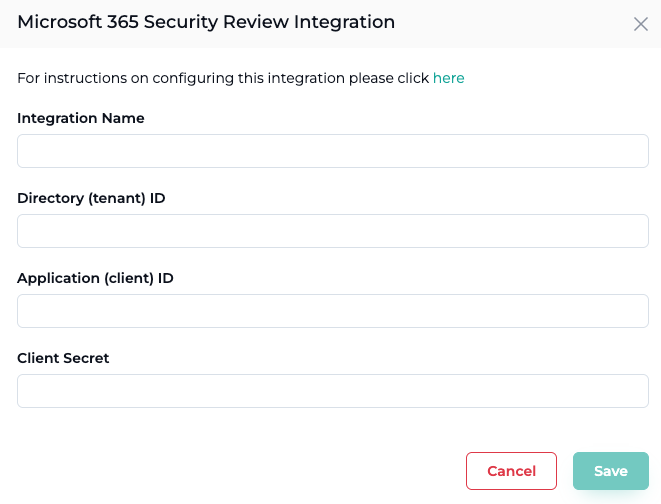
- Select Microsoft 365 Security Review Integration
- Name the Integration and fill in the details captured from step 10
- After the integration is successfully added the integration will become Active but remain will remain in a Pending state until a M365 Security Report is Generated through the Assistant Module.
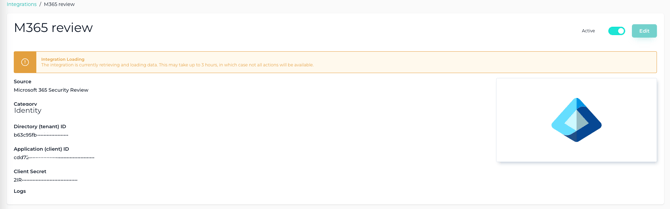
Please note that the data captured will only be available from the Microsoft 365 Security Review Report that is generated from the Assistant module.
Additionally Cyberknowledge will connect to Microsoft 365 when a report is requested only.